Customer data rarely stays in one place forever. As a business grows, its CRM often grows with it — until the system that once seemed perfect starts feeling like a suitcase that has been packed, unpacked, and packed again for ten years.
At this point, businesses may consider moving to a more flexible CRM platform. But CRM migration is not simply about exporting contacts from one system and importing them into another. It involves data assessment, cleaning, mapping, testing, security, integrations, and user training.
A well-planned CRM data migration can help businesses maintain data accuracy while moving to a system that better supports their current operations. A poorly planned migration, on the other hand, can create duplicate records, broken workflows, missing information, and plenty of unnecessary headaches.
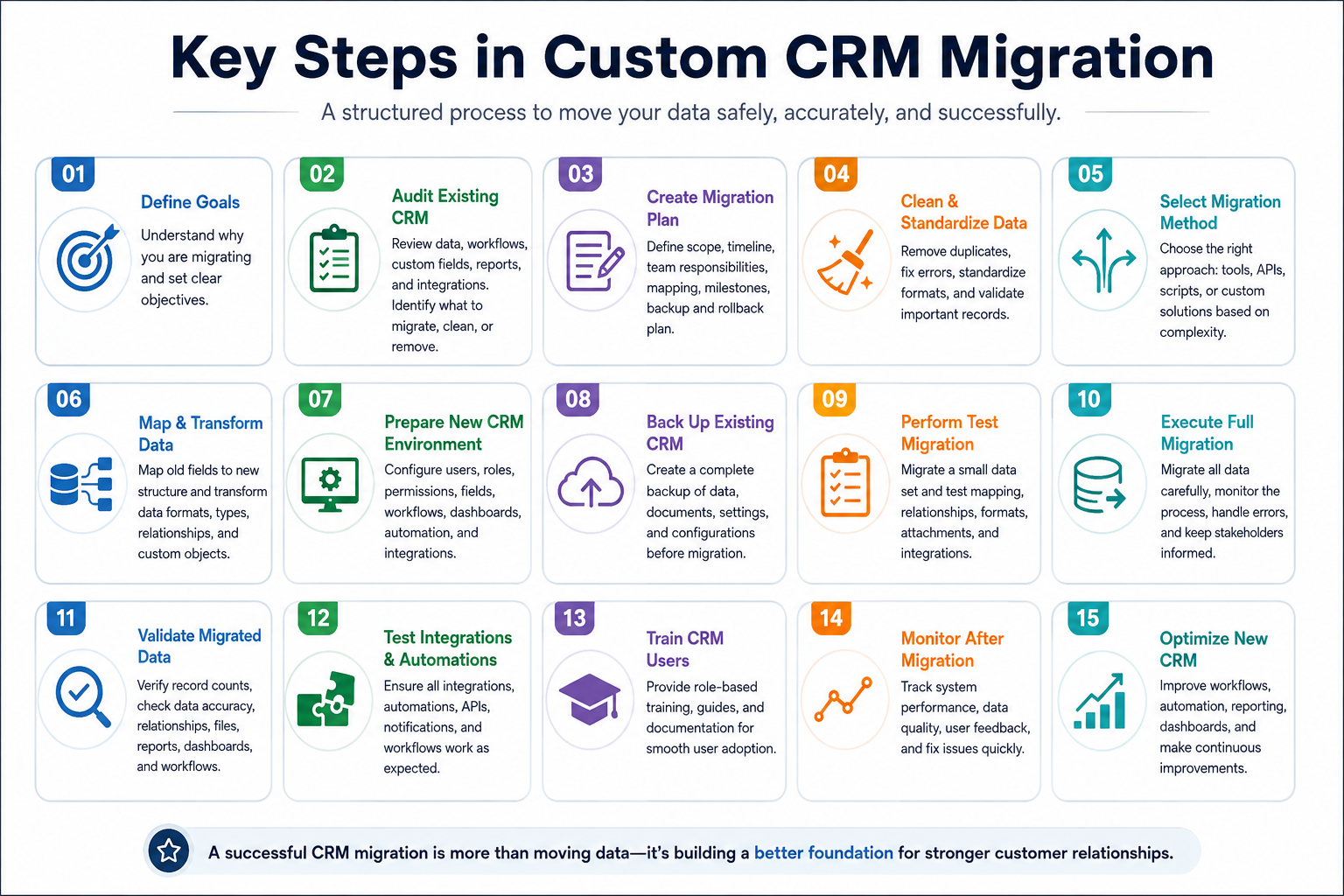
So, what are the key steps involved in custom CRM migration? Let’s break them down.
1. Define the Goals of CRM Migration
Before moving any data, we need to understand why the migration is happening in the first place.
Businesses may migrate because their existing CRM has become outdated, cannot handle increasing data volumes, lacks required integrations, or does not support their current workflows. Others may want better automation, reporting, scalability, or customization.
Clear objectives make the migration easier to manage. Instead of simply saying, “We need a new CRM,” define measurable goals such as:
- Improve customer data accuracy.
- Reduce duplicate records.
- Integrate the CRM with other business systems.
- Improve reporting and analytics.
- Automate repetitive processes.
- Support future business growth.
Once the destination is clear, deciding what needs to move becomes much easier.
2. Audit the Existing CRM System
The next step is to understand what already exists.
We need to review the current CRM database, including contacts, companies, leads, opportunities, activities, notes, documents, custom fields, workflows, reports, integrations, and user permissions.
This audit helps identify which information is valuable, which data is outdated, and which elements should not be transferred.
For example, a company may discover that thousands of old customer records have not been touched for years. Migrating all of them without evaluation could increase database size without providing much business value.
A proper audit answers an important question — What actually needs to move?
3. Create a Detailed Migration Plan
Once the existing environment is understood, the next step is planning.
A migration plan should define:
- Data to be migrated.
- Data to be archived or removed.
- Migration timeline.
- Responsible teams.
- Field-mapping requirements.
- Integration requirements.
- Testing procedures.
- Backup strategy.
- Rollback process.
- Post-migration validation.
The plan should also account for business operations. If the CRM is used continuously by sales and customer support teams, migrating during a busy business period could create unnecessary disruption.
A little planning here can save a lot of troubleshooting later — which is generally a good trade.
4. Clean and Standardize the Data
Moving poor-quality data into a new CRM does not magically make it better.
If the old system contains duplicate contacts, incomplete records, inconsistent phone numbers, outdated email addresses, or incorrectly formatted fields, those problems should be addressed before migration.
Data cleaning may include:
- Removing duplicate records.
- Correcting invalid information.
- Standardizing formats.
- Completing important missing fields.
- Removing obsolete records.
- Validating email addresses and phone numbers.
- Normalizing company names.
This is one of the most important stages because the quality of the destination CRM depends heavily on the quality of the source data.
In simple terms — clean data first, migrate second.
5. Choose the Right Migration Approach
Not every migration requires the same technical approach.
Depending on the size and complexity of the project, businesses may use:
- Manual migration.
- CRM migration tools.
- APIs.
- ETL processes.
- Custom scripts.
- Automated migration platforms.
- Custom-built migration solutions.
For a small database with straightforward fields, an existing migration tool may be enough.
For larger businesses with complex workflows, multiple integrations, custom objects, or unique business rules, more specialized solutions may be required. In such cases, custom CRM software development services can help create migration workflows around the organization's specific requirements rather than forcing the business to fit into a generic process.
The right approach depends on the systems involved, not simply on what looks easiest initially.
6. Map the Data Fields
Field mapping connects information from the old CRM to the appropriate fields in the new system.
For example:
Old CRM: Customer Phone
New CRM: Mobile Number
Or:
Old CRM: Lead Source
New CRM: Acquisition Channel
Simple? Sometimes.
But complex CRM environments can contain hundreds of fields, custom objects, relationships, and different data formats. That is where field mapping becomes more technical.
The migration team should document how each important field will be transferred and transformed. Special attention should be given to customer relationships, historical activities, attachments, and custom business data.
A good mapping strategy ensures that information does not simply arrive in the new CRM — it arrives in the right place.
7. Prepare the New CRM Environment
Before importing anything, the destination CRM needs to be configured properly.
This may include:
- User accounts.
- Roles and permissions.
- Departments.
- Custom fields.
- Pipelines.
- Workflows.
- Automation rules.
- Dashboards.
- Reports.
- Notifications.
- Integrations.
The destination environment should reflect the organization's business processes.
This is also a good opportunity to remove unnecessary complexity. If the previous CRM contained dozens of fields that nobody used, there is little reason to recreate the same digital clutter.
Migration should be a fresh start — not a photocopy of the old system.
8. Back Up the Existing CRM
Before making major changes, create a reliable backup.
The backup should cover the important information required for recovery, including customer records, activities, documents, attachments, and other relevant CRM data.
The backup should also be stored securely and access should be limited to authorized users.
Why does this matter?
Because even carefully planned migrations can encounter unexpected issues. A reliable backup gives the business a recovery option if records are corrupted, transferred incorrectly, or accidentally deleted.
It is one of those steps that feels unnecessary right up until it becomes extremely necessary.
9. Perform a Test Migration
A full migration should not be the first migration.
Instead, businesses should begin with a smaller sample of records.
The test migration can reveal issues such as:
- Incorrect field mapping.
- Missing information.
- Duplicate records.
- Formatting problems.
- Broken relationships.
- Failed attachments.
- Integration errors.
- Incorrect permissions.
For example, if 500 test records reveal that customer phone numbers are being placed into the wrong field, the issue can be fixed before millions of records are affected.
Testing is cheaper than repairing a large-scale migration mistake.
10. Execute the Full CRM Migration
Once the test migration is successful, the full migration can begin.
The process should be monitored carefully from start to finish.
Depending on the system, businesses may migrate data in stages instead of moving everything simultaneously. This can reduce risk and make troubleshooting easier.
The migration team should monitor:
- Successfully migrated records.
- Failed records.
- Duplicate entries.
- Missing information.
- Transformation errors.
- API failures.
- Integration problems.
Timing is also important. Organizations should select a migration window that minimizes disruption to sales, support, marketing, and other teams.
The goal is simple — move the data without bringing the business to a standstill.
11. Validate the Migrated Data
After migration, the work is not finished.
The new CRM needs to be checked carefully.
Validation should compare the source and destination systems to confirm that important information has transferred correctly.
Teams should verify:
- Total record counts.
- Customer information.
- Company records.
- Deals and opportunities.
- Activities and notes.
- Custom fields.
- Attachments.
- Relationships.
- Historical information.
Reports and dashboards should also be checked.
A migration tool saying “Completed Successfully” is useful, but it is not the same thing as business validation. The real question is whether users can actually find and use the information they need.
12. Test Integrations and Automations
Modern CRMs rarely work alone.
They may connect with accounting software, marketing platforms, email systems, ERP software, customer portals, communication platforms, payment systems, and other business applications.
After migration, each important integration should be tested.
For example:
- Does a new lead reach the correct sales representative?
- Are automated emails working?
- Are customer activities being recorded?
- Are accounting records synchronized?
- Are API connections functioning correctly?
- Are notifications being triggered?
A CRM can have perfectly migrated customer records and still create operational problems if its integrations are broken.
13. Train CRM Users
Technology is only useful when people know how to use it.
After migration, employees should receive appropriate training based on their roles.
Sales teams may need training on pipelines and lead management. Customer support teams may focus on customer history and ticket information. Managers may need guidance on dashboards and reports.
Training can include:
- Live demonstrations.
- Documentation.
- Video tutorials.
- Role-based sessions.
- FAQs.
- Practical exercises.
We have seen a technically impressive system become surprisingly unpopular simply because users were expected to figure it out themselves.
A little training can go a long way.
14. Monitor the CRM After Migration
The first few weeks after migration are important.
Users may discover issues that were not visible during testing. A field may be confusing, a workflow may need adjustment, or an integration may behave differently under real-world conditions.
Businesses should monitor:
- Data quality.
- User activity.
- Error logs.
- Automation performance.
- Integration status.
- Customer records.
- Reporting accuracy.
User feedback should also be collected.
This stage allows the organization to identify small problems before they become large operational issues.
15. Optimize the New CRM
Migration should not be treated as the finish line.
Once the new CRM is operating successfully, businesses can start optimizing it.
This may involve:
- Improving automation.
- Removing unnecessary fields.
- Refining dashboards.
- Improving reports.
- Updating workflows.
- Adjusting permissions.
- Adding useful integrations.
- Improving user experience.
The migration process often reveals inefficiencies that were hidden inside the old system.
That makes migration more than a technical exercise — it becomes an opportunity to improve how customer information is managed across the business.
Common Challenges in Custom CRM Migration
Even well-planned migration projects can face challenges.
Data Loss
Incorrect mapping or failed migration processes can result in missing information.
Duplicate Records
Poor data cleaning can cause duplicate contacts or companies to appear in the new CRM.
Integration Problems
Existing integrations may not work with the new CRM without modification.
Data Compatibility
Different systems may use different formats, field structures, or database architectures.
Downtime
Large migrations may affect business operations if they are not scheduled properly.
User Resistance
Employees may be comfortable with the old system and reluctant to adopt new workflows.
Security Risks
Customer information must be protected during extraction, transfer, storage, and validation.
Recognizing these challenges early makes them much easier to manage.
How Can Businesses Make CRM Migration Successful?
A successful migration usually depends on a combination of technical preparation and business involvement.
Businesses should:
- Define clear migration objectives.
- Audit the existing CRM.
- Clean the data.
- Create detailed field mappings.
- Back up critical information.
- Configure the destination CRM.
- Perform test migrations.
- Validate the migrated records.
- Test integrations.
- Train employees.
- Monitor the new system.
- Continue optimizing after launch.
Most importantly, migration should be treated as a business project rather than just an IT task.
Sales, marketing, customer support, management, and technical teams may all depend on the CRM. Their input can make the migration more practical and user-friendly.
When Should a Business Consider Custom CRM Migration?
There is no universal moment when every company should migrate.
However, migration may be worth considering when:
- The existing CRM cannot scale.
- Business processes have changed significantly.
- The current platform lacks important features.
- Data is spread across multiple systems.
- Integrations are difficult to maintain.
- Reporting is unreliable.
- The CRM is expensive to customize.
- Employees are relying heavily on spreadsheets or disconnected tools.
- Security requirements have changed.
- The organization needs greater control over its CRM environment.
The key is not to migrate simply because a newer CRM exists.
The goal should be to move because the new environment solves real business problems.
Conclusion
Custom CRM migration is not simply a matter of moving records from one database to another. It is a structured process involving planning, data cleaning, field mapping, testing, migration, validation, integration checks, and user adoption.
The biggest mistake is treating migration as a one-click operation. Customer data has relationships, history, workflows, and business meaning. Moving it correctly requires understanding all of those elements.
With a clear strategy and proper testing, businesses can use migration as an opportunity to improve data quality, simplify workflows, strengthen integrations, and create a CRM environment that is ready for future growth.
After all, the purpose of migration is not just to move yesterday's data into a new system. It is to build a better foundation for tomorrow's customer relationships.
FAQs
What is CRM migration?
CRM migration is the process of moving customer and business data from one CRM platform or system to another. It can include customer records, leads, opportunities, activities, notes, documents, workflows, and other relevant information.
How long does CRM migration take?
The timeline depends on factors such as database size, data quality, number of integrations, system complexity, customization requirements, and testing needs. A simple migration may take relatively little time, while an enterprise migration can require several weeks or longer.
What data should be migrated to a new CRM?
Businesses commonly migrate contacts, companies, leads, opportunities, activities, notes, customer history, documents, and other important records. The exact scope should be determined after auditing the existing CRM.
How can businesses prevent data loss during migration?
Businesses should create complete backups, clean and validate data, perform test migrations, use detailed field mapping, and validate records after the final migration.
Is CRM migration difficult?
CRM migration can be straightforward for small and simple systems. However, complex databases with custom workflows, integrations, historical records, and large data volumes require more detailed planning and technical expertise.
Should businesses migrate duplicate CRM records?
No. Duplicate records should generally be identified, reviewed, and cleaned before migration. Moving unnecessary duplicates can make the new CRM harder to manage.
What happens if CRM integrations stop working after migration?
Integrations should be tested before and after migration. If an integration fails, the relevant API, authentication settings, field mapping, or workflow may need to be updated for the new CRM environment.
Can a custom CRM developer help with migration?
Yes. Experienced CRM developers can help with data assessment, migration architecture, field mapping, integrations, automation, testing, security, and post-migration optimization — particularly when standard migration tools cannot handle complex requirements.


 Search in Classifieds
 Search in Groups
 Search in Polls
 Search in Members
 Search in Members
 Search in News
 Search in Businesses
 Search in Contests
 Search in Events
 Search in Music Albums
 Search in Music Songs
 Search in Quotes
 Search in Site Team



Share this page with your family and friends.