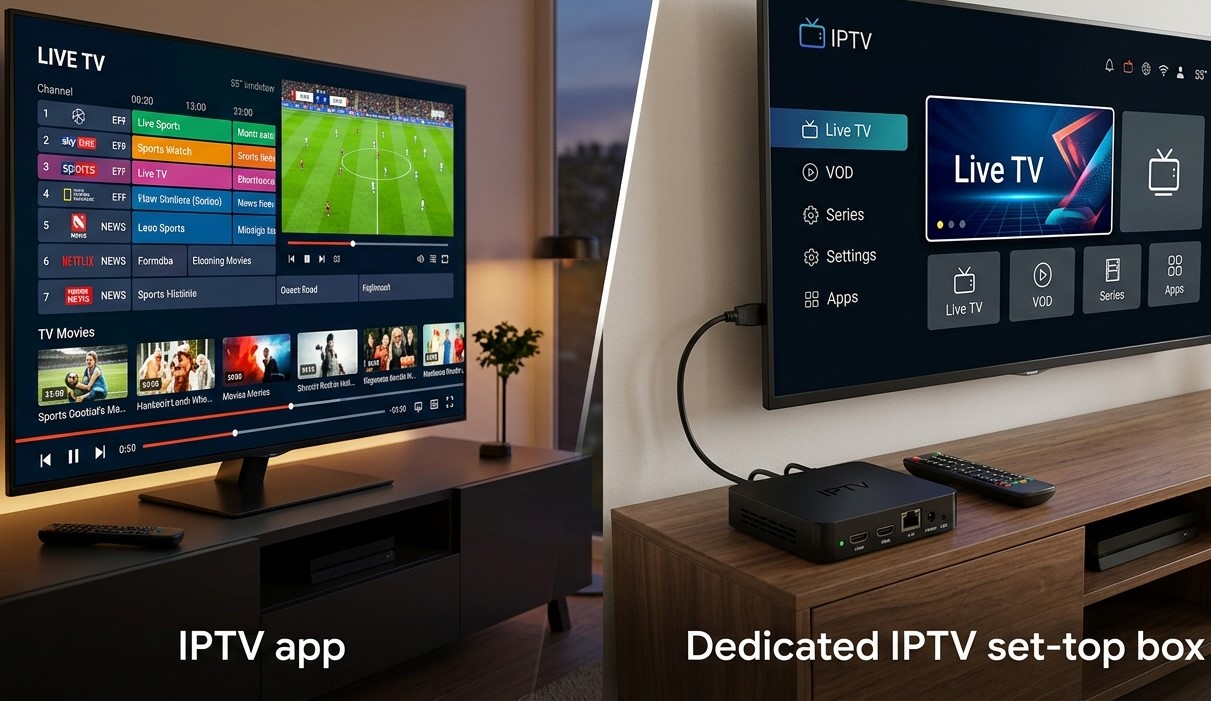
The way people watch television has changed significantly with the growth of internet-based entertainment. Instead of relying only on traditional cable or satellite services, viewers can now access compatible television programming through Smart TVs, smartphones, tablets, computers, streaming platforms, and dedicated IPTV devices.
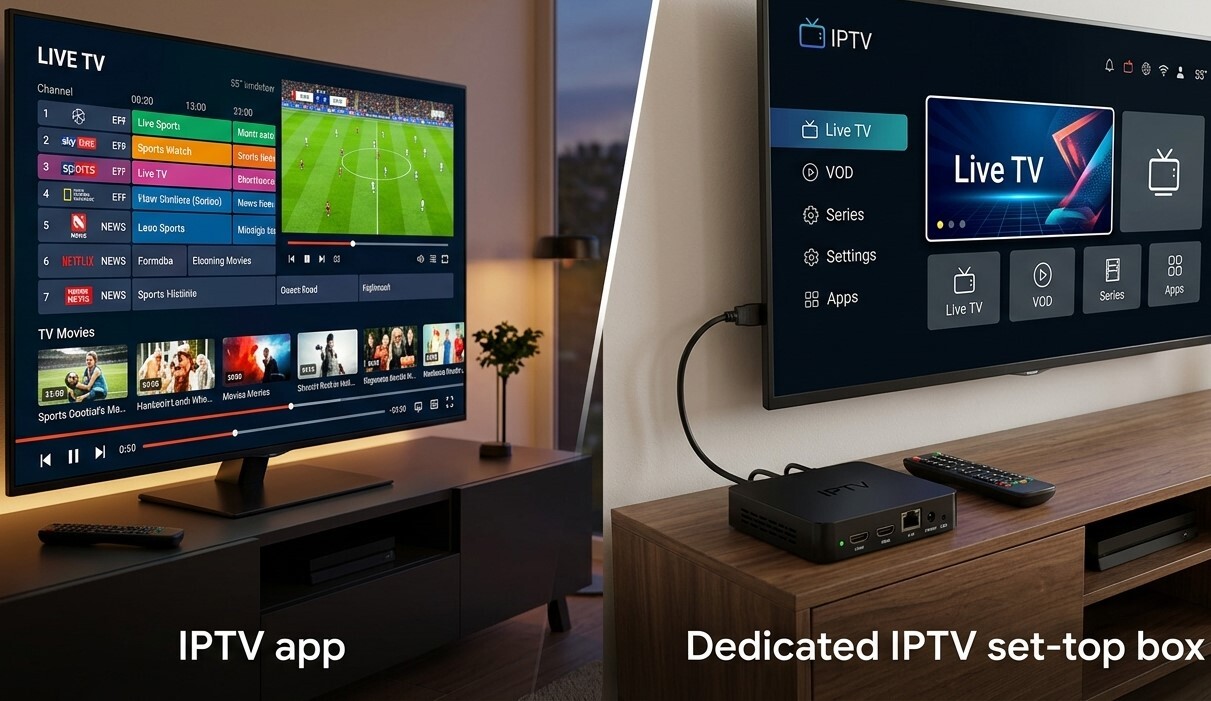
Two common approaches are using an IPTV app on an existing device or using a dedicated IPTV device designed primarily for television streaming. Both options can provide access to compatible IPTV services, but they offer different experiences in terms of convenience, performance, controls, connectivity, and setup.
For viewers researching Parivar IPTV, understanding these differences can make it easier to choose the right setup. An Indian IPTV Set Top Box can be particularly useful for households that want a dedicated television-based entertainment system, while an IPTV app may be more convenient for users who already own a compatible Smart TV or mobile device.
What Is an IPTV App?
An IPTV app is software that runs on a compatible device and provides an interface for accessing an IPTV service.
Depending on the provider and platform, an IPTV application may be installed on:
- Smart TVs
- Android TV devices
- Smartphones
- Tablets
- Computers
- Compatible streaming devices
The application essentially turns an existing compatible device into an IPTV viewing platform.
The exact features vary between applications. Some may provide live channels, while others can support features such as electronic program guides, favorites, search, catch-up functionality, or on-demand programming.
What Is a Dedicated IPTV Device?
A dedicated IPTV device is physical hardware designed to provide a television-focused streaming experience.
An Indian IPTV Set Top Box is one example of this type of setup.
Instead of installing an application directly on a television or phone, the dedicated device connects to the television, usually through HDMI, and runs compatible IPTV software.
A typical setup may look like:
Internet → Router → IPTV Device → HDMI → Television
The device can provide its own operating system, remote control, application environment, network connectivity, and settings.
IPTV Apps vs. Dedicated Devices at a Glance
The biggest difference is simple:
IPTV App: Uses hardware you already own.
Dedicated IPTV Device: Adds separate hardware specifically for the television.
Neither option is automatically better for everyone. The right choice depends on your television, internet connection, viewing habits, technical preferences, and the IPTV service you intend to use.
1. Hardware Requirements
One of the most obvious differences is hardware.
With an IPTV app, you use an existing compatible device. For example, if your Smart TV supports the required IPTV application, you may not need to purchase additional hardware.
A dedicated device requires an additional physical box or streaming unit.
This means an IPTV app can be more convenient for someone who wants to avoid extra equipment.
On the other hand, dedicated hardware can be useful when an existing television does not provide the required application support.
2. Installation Process
IPTV apps can be relatively straightforward to install when the application is officially available through the device's app store.
The general process is:
- Open the device's application store.
- Find the compatible IPTV application.
- Install it.
- Follow the IPTV provider's setup instructions.
- Sign in or enter the required service information.
A dedicated IPTV device requires additional steps.
You may need to:
- Connect the device to power.
- Connect it to the television through HDMI.
- Connect it to Wi-Fi or Ethernet.
- Configure the device.
- Install or open the compatible IPTV application.
- Follow the provider's instructions.
For users comfortable with technology, both options can be manageable.
3. Compatibility
Compatibility should be one of the first things you check.
Not every IPTV application works on every Smart TV operating system.
For example, an application available on one platform may not be available on another.
A dedicated device can sometimes provide broader application support, depending on its operating system.
However, a dedicated device is not automatically compatible with every IPTV service either.
Before purchasing an Indian IPTV Set Top Box, check whether the IPTV service supports the device and its operating system.
If you are considering Parivar IPTV, review the service's current supported devices and application requirements before making a hardware decision.
4. Performance
Performance depends on both the software and hardware.
An IPTV app running on an older Smart TV may feel slower than the same type of application running on newer hardware.
You might notice:
- Slow menu navigation
- Delayed application startup
- Slow channel switching
- Occasional application crashes
A dedicated device can provide newer or more capable hardware without requiring you to replace your entire television.
However, performance also depends on the application, network, IPTV provider, and video source.
Buying a powerful device cannot compensate for an unstable internet connection.
5. User Interface
IPTV applications and dedicated devices can both provide user-friendly interfaces, but the overall experience may differ.
A Smart TV application usually operates within the television's existing operating system.
A dedicated device may provide a separate interface specifically designed for its hardware and remote control.
A good IPTV interface should make it easy to:
- Browse channels
- Search for programs
- Access favorites
- Open the EPG
- Change settings
- Browse available on-demand content
The best interface is often a matter of personal preference.
6. Remote Control Experience
A dedicated IPTV device usually comes with its own remote control.
This can be a major advantage for people who prefer traditional television operation.
Users can sit back and navigate through channels and menus without relying on a smartphone.
Smart TV IPTV apps can also be controlled with the television's existing remote.
However, the quality of navigation depends on the Smart TV platform and application.
For older family members, a simple dedicated remote may sometimes provide a more familiar experience.
7. Internet Connectivity
Both IPTV apps and dedicated devices require an internet connection.
The difference is in the networking hardware available on the device.
Smart TVs generally provide Wi-Fi and sometimes Ethernet.
Dedicated IPTV devices may provide:
- Wi-Fi
- Ethernet
- Different wireless standards
- Additional network features
For a stationary Indian IPTV Set Top Box, Ethernet can be useful when the router is located nearby.
A wired connection can provide a consistent local network connection and may be helpful when Wi-Fi is unreliable.
8. Picture Quality
Both IPTV apps and dedicated devices can support different video resolutions, depending on the platform and IPTV service.
Possible resolutions include:
However, the device is only one part of the equation.
Picture quality can also depend on:
- IPTV source quality
- Bitrate
- Video encoding
- Internet stability
- Television capabilities
- Application performance
A 4K-capable device does not automatically make every channel 4K.
9. Storage and Applications
Smart TVs already have their own storage and application ecosystem.
Installing an IPTV app simply adds another application to the television.
Dedicated devices may offer additional storage and a broader application environment, depending on the operating system.
This can be useful if you want to use the device for more than IPTV.
For example, you might want a single device for compatible IPTV applications and other legitimate entertainment apps.
10. Software Updates
Software updates can affect security, compatibility, and performance.
Smart TV manufacturers may release updates for their television operating systems.
IPTV applications may also receive updates separately.
Dedicated devices can have their own firmware and operating system updates.
Before purchasing a device, check whether the manufacturer provides ongoing software support.
An inexpensive device with little or no update support may not offer the same long-term value as a properly supported product.
11. Television Age
The age of your television can influence which option makes more sense.
If you already own a modern Smart TV with good application support, installing an IPTV app may be the simplest solution.
If you have an older television without modern application functionality, a dedicated device can potentially add internet-based capabilities through its HDMI connection.
This can be a more practical alternative to replacing an otherwise functional television.
12. Portability
IPTV apps have an advantage when it comes to portability.
A compatible application can potentially be used on supported smartphones, tablets, or laptops.
This makes it convenient for people who want to access supported entertainment away from the living-room television, subject to the service's terms and geographic availability.
Dedicated devices are less portable because they require a television, power source, and network connection.
They are primarily designed for fixed home entertainment setups.
13. Family Use
For family viewing, dedicated devices can offer a more traditional television experience.
A family can use one remote control and one large-screen television.
An IPTV app installed directly on a Smart TV can provide a similar experience without additional hardware.
The decision therefore depends on which setup is easier for your household.
If older family members are using the system, simple menus and clear controls may be more important than advanced technical features.
14. Multi-Device Entertainment
IPTV apps are naturally suited to multi-device environments.
If a service supports multiple devices, different household members may be able to access compatible content through Smart TVs, phones, tablets, or computers.
Dedicated devices are more focused on television-based viewing.
Some households may therefore use both:
Dedicated Device → Main Living-Room Television
IPTV App → Secondary Supported Devices
Whether simultaneous viewing is allowed depends on the IPTV service's subscription rules.
15. Cost Considerations
Cost is another important difference.
An IPTV app may not require additional hardware if you already own a compatible Smart TV.
A dedicated device requires an upfront hardware purchase.
However, price should not be the only consideration.
You should also consider:
- Device lifespan
- Performance
- Software support
- Compatibility
- Network features
- Ease of use
- Television quality
A slightly more capable device may provide better long-term value than the cheapest available option.
16. Troubleshooting
When an IPTV app has problems, troubleshooting may involve several layers.
For example:
Television → Operating System → IPTV App → Network → IPTV Service
A dedicated device creates another layer:
Television → IPTV Device → IPTV App → Network → IPTV Service
This can make troubleshooting more complex in some situations.
However, dedicated hardware can also make it easier to isolate the television from the IPTV software environment.
17. Which Option Is Better for Older TVs?
For an older television that has an HDMI port but limited Smart TV functionality, a dedicated IPTV device may be particularly useful.
Instead of replacing the television, you can potentially connect compatible external hardware.
This can add modern streaming capabilities while allowing you to continue using the existing screen.
Always check the television's available ports and the device's output requirements before purchasing.
18. Which Option Is Better for Smart TVs?
If your Smart TV already supports the IPTV application you want, an app may be the most convenient option.
There is no need for another box, another power adapter, or another remote.
The television remains the central entertainment device.
However, if the built-in Smart TV hardware is slow or does not support the desired application, an external device may provide a better experience.
Choosing an Indian IPTV Set Top Box
If you prefer a dedicated television setup, an Indian IPTV Set Top Box can be considered.
Before purchasing, evaluate:
- IPTV service compatibility
- Operating system
- Processor
- RAM
- Storage
- Wi-Fi support
- Ethernet availability
- HDMI compatibility
- Supported video resolution
- Remote control
- Software updates
The most important factor is compatibility with the IPTV service you plan to use.
Do not purchase hardware simply because it advertises advanced specifications.
How Parivar IPTV Fits Into the Choice
For viewers considering Parivar IPTV, the choice between an IPTV application and dedicated hardware should begin with compatibility.
Check which platforms are officially supported and determine whether your existing Smart TV or preferred device meets the requirements.
If your television supports the required application and provides satisfactory performance, an IPTV app may be enough.
If you want a dedicated television-focused setup or your existing TV lacks suitable application support, an Indian IPTV Set Top Box may be worth considering.
Common Mistakes to Avoid
Buying a Device Without Checking Compatibility
Always verify that the IPTV service supports the hardware and operating system.
Choosing Based Only on 4K
4K support does not guarantee excellent streaming.
Ignoring Network Quality
A powerful device cannot fix an unstable internet connection.
Buying Unnecessary Hardware
If your Smart TV already provides everything you need, an additional device may not be necessary.
Using Unsupported Applications
Follow the IPTV provider's official setup instructions and use legitimate applications.
Which One Should You Choose?
The answer depends on your situation.
Choose an IPTV App If:
- You already own a compatible Smart TV.
- You want a simple setup.
- You do not want additional hardware.
- Your television performs well.
- You prefer using the TV's existing remote.
Consider a Dedicated IPTV Device If:
- Your TV does not support the required IPTV application.
- Your Smart TV hardware is outdated.
- You want a dedicated television environment.
- You prefer a separate remote.
- You want to upgrade an older HDMI-equipped television.
- You want more control over the streaming hardware.
Final Thoughts
IPTV apps and dedicated IPTV devices both provide ways to access compatible internet-based television, but they serve different needs.
An IPTV app can be the simplest option when you already own a modern compatible Smart TV or another supported device. It eliminates the need for additional hardware and can provide convenient access to live and available on-demand programming.
A dedicated device, on the other hand, can provide a more focused television experience and may be especially useful for older televisions or households that prefer dedicated hardware and traditional remote-based navigation.
If you are researching Parivar IPTV, start by checking the service's current device compatibility. From there, consider your television, internet connection, preferred viewing habits, and budget. An Indian IPTV Set Top Box may be a practical choice for a dedicated large-screen setup, while a compatible IPTV app may be sufficient for users who already have suitable Smart TV hardware.
Ultimately, there is no universal winner. The best option is the one that provides reliable compatibility, smooth performance, simple navigation, and convenient access to the IPTV content you actually want to watch.


 Search in Classifieds
 Search in Groups
 Search in Polls
 Search in Members
 Search in Members
 Search in News
 Search in Businesses
 Search in Contests
 Search in Events
 Search in Music Albums
 Search in Music Songs
 Search in Quotes
 Search in Site Team


Share this page with your family and friends.