Walk through any server room or network closet and you will see a tangle of cables running behind racks, into power distribution units, and out to individual servers. Most of that tangle goes unnoticed. But hidden in the mix is one connection that quietly does more work than almost anything else in the rack: the c14 power cord paired with a c13 power cord. Together, these two connectors form one of the most common power links in modern IT infrastructure, and understanding how they function can save a lot of confusion when equipment needs to be installed, replaced, or troubleshot.
What Exactly Is a C14 to C13 Connection?
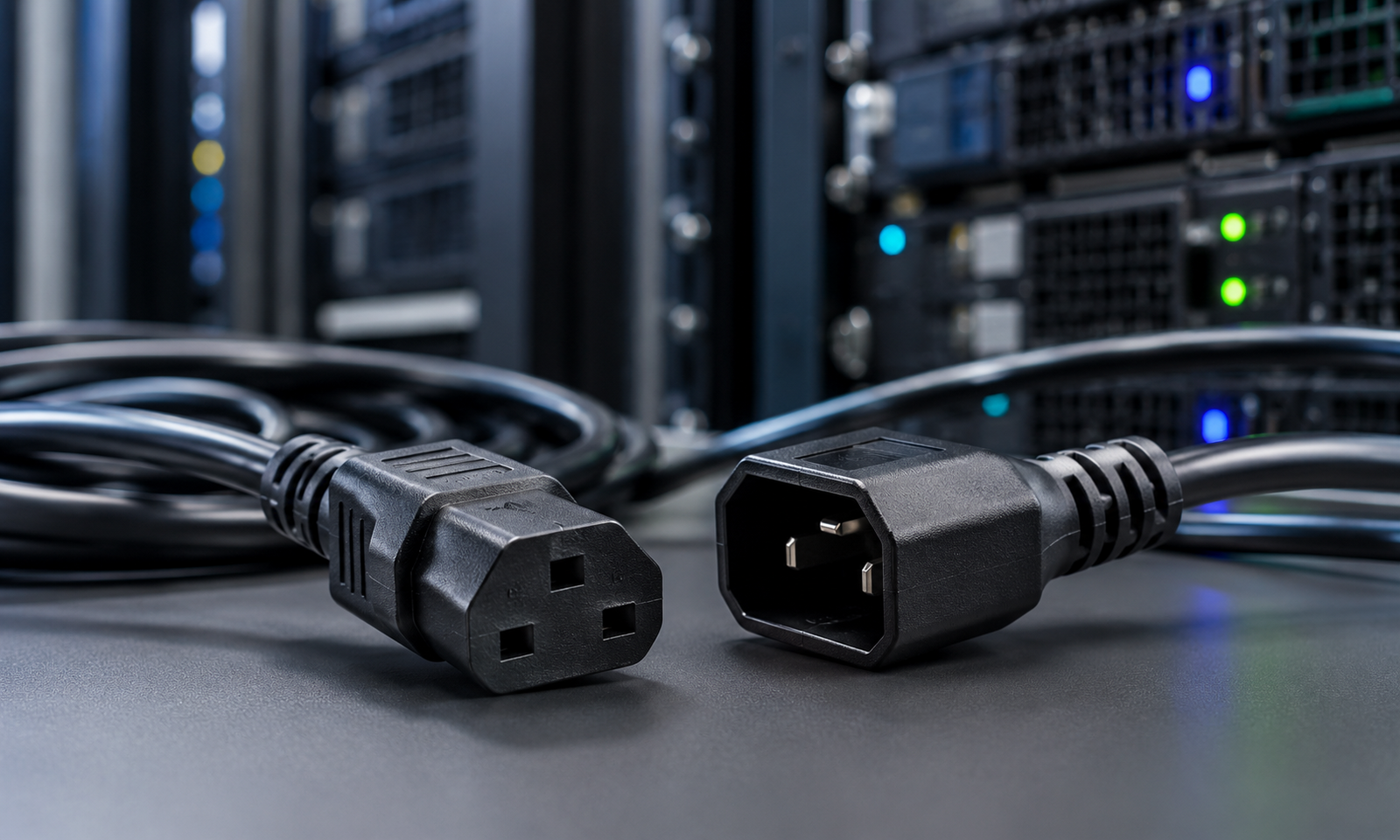
The terms c13 and c14 come from the IEC 60320 standard, which defines connector shapes used on power cords for computers, servers, monitors, and similar electronics around the world. The naming convention can be confusing at first, but the logic behind it is simple. Even numbers in this standard refer to male connectors, and odd numbers refer to female connectors. That means the c14 is the male inlet, usually found on the back of a device such as a power distribution unit, uninterruptible power supply, or server chassis. The c13 is the female connector, most often seen on the end of a standard computer power cord that plugs into that inlet.
When people talk about a c13 to c14 power cord, they are usually describing a cable that connects a device with a c14 inlet to another device or outlet that accepts a c13 plug. This is different from a simple wall-to-device power cord. Instead, a c13 to c14 power cord typically links two pieces of equipment together, such as a server drawing power from a rack-mounted power strip, rather than connecting directly to a wall socket.
Why This Small Cable Matters So Much
It is easy to overlook a cord that looks so ordinary, but the c13 to c14 power cord plays a critical role in keeping data centers and network closets running. Every rack of equipment depends on a steady, uninterrupted flow of power, and this connector type is the standard link between power distribution units and the servers, switches, and storage devices that rely on them. A poor connection, a worn-out cord, or a mismatched gauge can lead to overheating, voltage drops, or unexpected downtime, which is the last thing any IT team wants to deal with during business hours.
Because this connector pair is so widely used, it also becomes a point of standardization across the industry. Manufacturers design servers, PDUs, and UPS units around the same c13 and c14 shapes so that equipment from different vendors can still be connected without needing custom adapters. This interoperability is one of the underappreciated strengths of the IEC 60320 standard.
Where You Will Typically Find These Connectors
A c14 power cord and its matching c13 counterpart show up in more places than most people realize. Some of the most common environments include:
• Data centers, where rows of server racks pull power from centralized PDUs
• Network closets and telecom rooms, where switches and routers need clean, dedicated power runs
• Desktop computers, monitors, and printers, which often use a standard c13 power cord straight from the wall
• Audio and video equipment racks, where consistent power delivery affects performance
• Backup power systems, where a c13 to c14 power cord connects equipment to a UPS unit during an outage
Key Specifications Worth Knowing
Not all cords that fit the c13 and c14 shape are built the same way, and the differences matter more than they might seem. Wire gauge, for instance, determines how much current a cord can safely carry over its length. Thinner cords are fine for light-duty devices like monitors, but heavier equipment such as servers or PDUs often calls for a thicker gauge to avoid excess heat buildup.
Temperature rating is another detail that is easy to miss. Standard c13 and c14 connectors are typically rated for use up to about seventy degrees Celsius, which is fine for most desktop and network equipment. High-performance servers that run hotter sometimes require connectors rated for higher temperatures, in which case a c15 or c16 style connector may be more appropriate instead of a standard c13 to c14 power cord.
Length is also worth planning ahead of time. Cords that are too short create tension on the connectors and can eventually lead to a loose or failing connection, while cords that are too long add unnecessary clutter to a rack and make cable management harder. Measuring the actual distance between the power source and the device, with a little slack for movement, avoids both problems.
Common Mistakes to Avoid
One of the most frequent errors people make is assuming any cord with matching connector shapes will work the same way, regardless of gauge or rating. This can lead to cords that overheat under sustained load, especially in racks running multiple high-draw devices. Another common mistake is neglecting to label cords in a busy rack. When a c13 to c14 power cord fails or needs to be swapped, having no record of which cord goes where can turn a five-minute task into a lengthy troubleshooting session.
It also helps to inspect cords periodically rather than waiting for a failure. A cord that looks fine on the outside can still have internal wear from repeated bending or from being pinched behind a rack. Regular visual checks, especially in high-heat environments, can catch problems before they cause downtime.
Safety Certifications and What They Signal
Beyond gauge and length, certification marks are one of the quickest ways to judge whether a cord meets basic safety expectations. Look for recognized marks that confirm a cord has been tested for insulation quality, fire resistance, and current-carrying capacity under normal operating conditions. These certifications do not guarantee a cord is the perfect fit for a specific device, but they do confirm the manufacturing process met an established baseline. Skipping this check is a common shortcut, especially when a cord is needed quickly, but it is one of the easiest details to verify before installation.
It is also worth paying attention to color coding in larger rack deployments. Many facilities assign specific cord colors to specific power sources, such as one color for a primary feed and another for a backup feed tied to a UPS. This visual system, combined with a properly rated c13 to c14 power cord, makes it much easier for technicians to trace connections quickly during maintenance or an emergency, without needing to physically follow a cable from end to end.
The Bottom Line
The c14 to c13 connection may never draw attention the way a new server or switch does, but it is one of the quiet essentials that keeps everything else running. Whether it is a single c13 power cord powering a desktop monitor or a rack full of c13 to c14 power cord connections feeding an entire row of servers, this small piece of hardware carries real responsibility. Taking the time to choose the right gauge, length, and rating for the job is a simple step that pays off in fewer surprises and more reliable uptime.


 Search in Classifieds
 Search in Groups
 Search in Polls
 Search in Members
 Search in Members
 Search in News
 Search in Businesses
 Search in Contests
 Search in Events
 Search in Music Albums
 Search in Music Songs
 Search in Quotes
 Search in Site Team



Share this page with your family and friends.