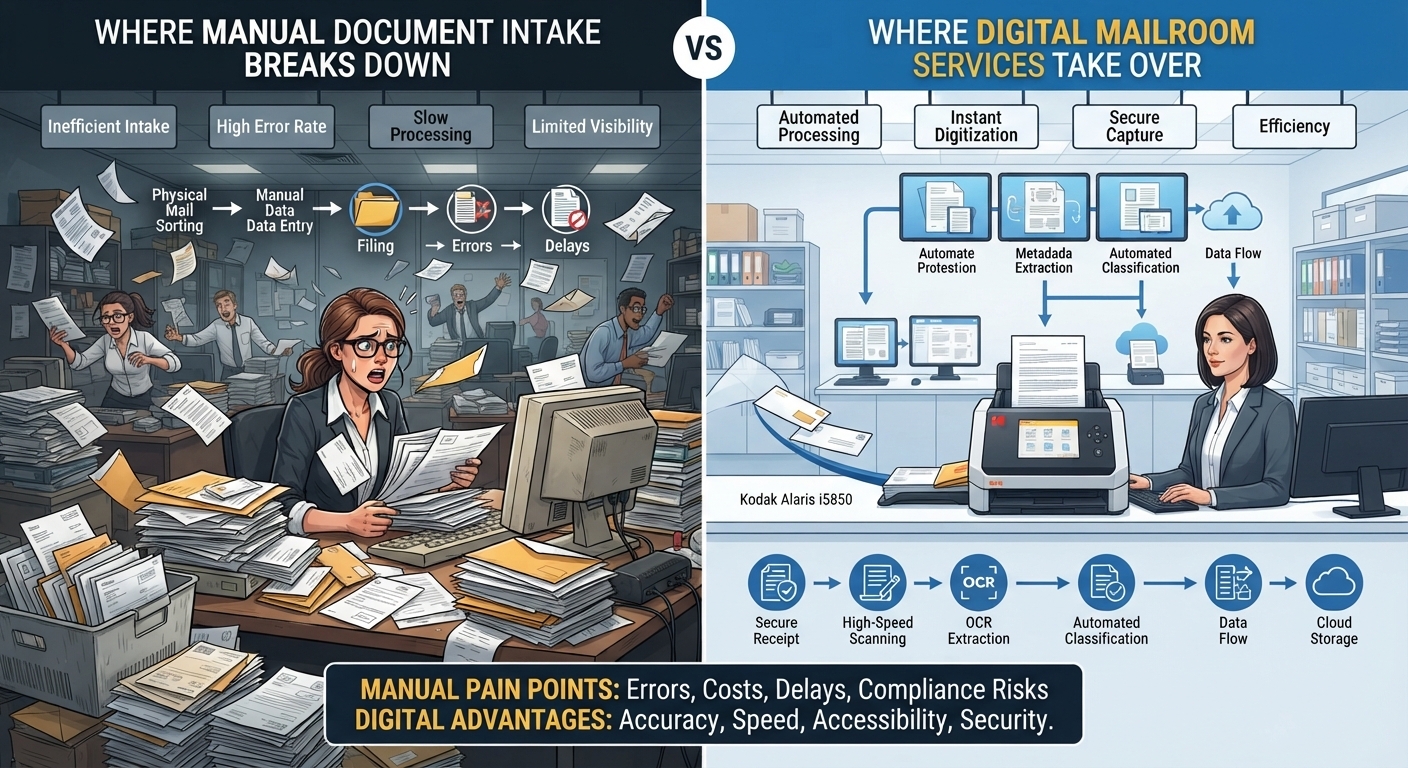
Manual document intake usually works well until volume, complexity, and accountability start increasing at the same time. A few invoices, customer forms, contracts, claims, or supplier documents can be handled through email, shared folders, scanning, and manual data entry without creating obvious problems. As the organization grows, however, those same processes begin producing delays, duplicate work, inconsistent routing, lost context, and weak visibility into what has been received or processed. That is where Digital Mailroom Services become more valuable. Instead of relying on employees to open, classify, rename, forward, extract, and re-enter information manually, a digital mailroom creates a structured intake layer that can capture incoming documents, identify what they are, extract relevant information, validate key fields, and route records into the correct downstream process. The real shift is not from paper to PDF. It is from uncontrolled intake to managed information flow.
Manual Intake Breaks First at the Point of Classification
One of the earliest problems in manual document handling is deciding what each incoming item actually is. An employee may receive invoices, contracts, applications, identity documents, complaints, purchase orders, statements, claims, and general correspondence through the same channel. Every document must be opened, reviewed, understood, and directed somewhere else. At low volume, that process can feel manageable. At higher volume, classification becomes repetitive and inconsistent. Different employees may use different naming conventions, route similar documents to different teams, or interpret unclear submissions differently. The result is not simply slower processing. Inconsistent classification can affect every step that follows, including retention, access, data extraction, approvals, and archiving. A digital mailroom can reduce this variability by applying defined classification rules and allowing human reviewers to focus on uncertain or exceptional cases rather than every routine document.
Shared Inboxes Become Hidden Processing Queues
Many organizations use shared inboxes as informal mailrooms because they are familiar and easy to deploy. The problem is that an inbox was designed for communication, not structured process management. Once document volume increases, the inbox becomes a hidden work queue with limited visibility. Employees may open messages without processing them, mark items unread again, forward attachments to colleagues, create folders based on personal habits, or download files for later handling. Managers may know how many emails exist but have little insight into how many actual business documents remain unresolved. A digital mailroom changes that model by treating each incoming record as a process item rather than an email. Documents can be captured, categorized, assigned, and routed in a way that makes status easier to track. This creates clearer accountability because teams can see what entered the organization, what has been processed, and what still requires attention.
Manual Data Entry Creates Delay and Error at the Same Time
Document intake often becomes expensive because employees do not merely receive files. They also re-enter information from those files into business systems. An invoice may require supplier name, amount, invoice number, purchase order reference, and due date to be typed into an ERP. An onboarding form may require customer or employee information to be entered into another platform. A claim may require case details to be copied into a workflow system. Every manual transfer adds time and creates another opportunity for mistakes. Typing errors, missing fields, inconsistent date formats, incorrect account numbers, and duplicated records can all begin at this stage. Digital Mailroom Services can reduce this burden by extracting structured information from incoming documents and passing validated data into downstream workflows. Human review still matters where confidence is low, but employees no longer need to retype every predictable field from every routine document.
Routing Breaks Down When Employees Become the Integration Layer
In many manual environments, people perform the work that software integration should handle. One employee receives a document, downloads it, renames it, uploads it into another application, sends an email to a colleague, and possibly saves a second copy somewhere else. The process works because employees remember what should happen next. That is fragile. When someone is absent, changes roles, or leaves the organization, important knowledge about routing can disappear with them. Manual routing also becomes inconsistent across departments because each team develops its own workaround. A digital mailroom creates a more formal routing layer. Once a document is identified, workflow rules can send it to finance, HR, legal, customer service, compliance, or another system based on document type, metadata, sender, or business rules. This reduces reliance on individual memory and creates a more repeatable process.
Duplicate Copies Multiply Faster Than Teams Realize
Manual intake creates copies almost automatically. A supplier sends an invoice by email. One employee downloads it. Another saves it in a shared folder. Finance uploads it into the accounting platform. Someone forwards the original email to a manager. A copy may also remain in local downloads and mailbox backups. By the end of the process, one business record can exist in several places without anyone knowing which version should be treated as authoritative. This duplication creates security, privacy, retention, and retrieval problems. It also increases the chance that employees will work from the wrong version. A structured digital mailroom can reduce unnecessary duplication by moving documents through controlled integrations rather than repeated downloads and forwarding. The goal is to establish a clear path from intake to the system or repository where the record should ultimately be managed.
Manual Intake Hides Processing Time
Organizations often measure how long it takes to approve an invoice, process an application, or resolve a claim without measuring what happened before the item officially entered the workflow. A document may arrive on Monday but sit in a mailbox until Wednesday. The operational system records processing beginning on Wednesday, so the two-day delay disappears from the metric. This creates a distorted view of performance. The business appears to have a processing problem when part of the real issue is intake latency. Digital mailroom workflows can timestamp records at the moment of receipt and track them through classification, validation, routing, and downstream processing. This creates a more accurate picture of total cycle time and helps operations teams identify where delays actually occur.
Exceptions Consume More Time Than Routine Documents
Manual processes treat normal documents and unusual documents almost the same. Employees open every file, inspect every field, and decide what to do next. This means highly skilled workers spend significant time handling predictable cases that require very little judgment. The more scalable model is exception-based processing. Routine documents can move automatically when classification and extraction confidence are high, while unclear submissions are routed to employees for review. A low-quality scan, missing identifier, unusual format, or inconsistent amount may require human intervention. The rest should not. This is one of the areas where Digital Mailroom Services can change the economics of document intake. Employees spend less time repeating basic tasks and more time resolving cases where human reasoning actually adds value.
Poor Intake Quality Creates Problems Further Downstream
A mistake at intake rarely stays at intake. If the wrong customer identifier is captured, the document may be attached to the wrong case. If an invoice number is entered incorrectly, duplicate detection may fail. If a contract is classified under the wrong category, the wrong retention policy may later be applied. If metadata is missing, archived records become harder to find. Manual intake therefore has downstream consequences across finance, compliance, customer service, records management, and analytics. A stronger mailroom process introduces quality controls earlier. Required fields can be validated before documents move forward. Missing information can be flagged. Duplicates can be identified. Low-confidence extraction can be reviewed before the data enters critical systems. Catching problems earlier is usually cheaper than correcting them after several systems have already consumed the wrong information.
Physical Mail Creates an Additional Location Problem
Paper-based intake adds another layer of friction because the document must first reach the employee who needs it. This model worked more naturally when teams were concentrated in one office. Hybrid and distributed work have made that assumption less reliable. A document arriving at headquarters may need to be reviewed by someone working from another location. Physical forwarding introduces delay, while ad hoc scanning and emailing create inconsistent security practices. A digital mailroom can centralize physical mail capture while allowing authorized employees to access the resulting records through normal business workflows. This separates the location where the document arrives from the location where work happens. For organizations operating across multiple offices, that can create a more standardized intake process.
Auditability Is Weak When Documents Move Informally
Manual workflows often leave incomplete evidence about what happened to a document. An attachment may be downloaded without logging why. A record may be forwarded to another employee with no structured handoff. A file may sit in a folder for months before someone discovers it. During an audit, investigation, or dispute, teams may need to reconstruct the process using email histories, file timestamps, or employee recollection. That can be slow and unreliable. A structured digital mailroom can record important events such as receipt, classification, extraction, validation, routing, review, and transfer into downstream systems. This does not mean tracking every technical event indefinitely. It means preserving meaningful process evidence that helps the organization understand how important documents were handled.
Security Weakens When Intake Depends on Informal Workarounds
Manual document intake frequently creates security exposure because employees prioritize completing the task over maintaining a perfect control environment. Sensitive files may be forwarded through email, stored temporarily on desktops, downloaded to unmanaged devices, or copied into shared folders with broad permissions. Each workaround creates another location where information needs to be protected. A digital mailroom can reduce these uncontrolled handoffs by keeping documents inside managed workflows and routing information directly to authorized systems. Security still depends on proper configuration, authentication, access control, and governance, but reducing unnecessary file movement removes many avoidable exposure points.
Retention Becomes Harder When Records Enter Without Context
Records management problems often begin at the moment a document first enters the organization. If the incoming file is not classified properly, it may never receive the correct retention rule later. A contract stored in a generic folder may be impossible to distinguish from an ordinary attachment. An employee document may remain in a mailbox longer than necessary. A customer record may be duplicated across several repositories with different deletion practices. Digital Mailroom Services can help establish governance context earlier by attaching document type, business identifiers, dates, and other relevant metadata during intake. This gives records teams a stronger foundation for retention, legal holds, access control, archiving, and eventual disposition.
Integration Determines Whether Automation Is Real
An organization can scan documents automatically and still operate a largely manual mailroom. The critical test is what happens after capture. If employees still download files, rename them, upload them into another application, and retype information manually, the process has only been partially digitized. Strong Digital Mailroom Services connect intake directly with the systems where work happens. Documents and extracted data can move into ERP platforms, CRM systems, case management applications, HR systems, document repositories, archives, or workflow tools without unnecessary handoffs. This is where the largest operational benefit often appears because integration removes entire steps rather than simply making existing steps faster.
Digital Mailrooms Change the Role of Operations Teams
The goal of automation is not to remove human oversight. It is to change where people spend their attention. In a manual environment, employees spend large amounts of time opening, sorting, naming, forwarding, and retyping information. In a more mature digital mailroom, routine handling becomes automated and employees manage exceptions, quality issues, unusual cases, and process improvements. This creates a more scalable operating model. Teams can handle higher document volumes without increasing manual effort at the same rate. It also gives managers better data about where problems occur, which document types generate the most exceptions, and where workflows need improvement.
When Digital Mailroom Services Take Over
The point where manual intake stops working is not defined by one specific document volume. It happens when the organization can no longer manage speed, accuracy, visibility, governance, and security consistently through human coordination alone. Warning signs include overflowing shared inboxes, repeated data entry, unclear document ownership, inconsistent naming, duplicate records, delayed routing, weak audit trails, growing exception backlogs, and excessive reliance on employees who know how the process works. Digital Mailroom Services become valuable when the business needs document intake to operate as an engineered workflow rather than an administrative habit. The strongest implementations do not simply digitize old mailroom practices. They redesign intake so that information becomes structured, validated, and actionable as early as possible.
Conclusion
Manual document intake rarely fails because employees are incapable of handling documents. It fails because the process depends on too many repetitive decisions, informal handoffs, disconnected systems, and invisible delays. As volume and complexity increase, those weaknesses begin affecting processing speed, data quality, security, retention, compliance, and customer service. Digital Mailroom Services address the problem by creating a controlled intake layer where documents can be captured, classified, validated, enriched with metadata, and routed directly into the right business process. The real value is not simply reducing paper. It is reducing the distance between receiving information and using it correctly. When document intake becomes structured at the beginning, every downstream workflow has a stronger foundation.


 Search in Classifieds
 Search in Groups
 Search in Polls
 Search in Members
 Search in Members
 Search in News
 Search in Businesses
 Search in Contests
 Search in Events
 Search in Music Albums
 Search in Music Songs
 Search in Quotes
 Search in Site Team



Share this page with your family and friends.